How to Future-Proof Your Tech Purchases: A Practical Guide
Buying new tech feels exciting. But that excitement can fade fast when your shiny new gadget feels outdated in just a year.
Technology moves fast. New standards emerge. Software updates demand more power. Your once cutting edge device slowly becomes yesterday’s news.
This is where smart planning makes all the difference. Future proofing your tech purchases means thinking beyond today’s needs.
It’s about choosing devices that grow with you. It’s about avoiding both extremes: buying outdated tech that dies quickly, and overspending on features you’ll never use.
In this guide, we’ll show you how to strike that balance. You’ll learn practical steps like keeping software updated and choosing upgradeable components.
We’ll cover common mistakes people make when buying tech. You’ll discover why rigid, non-upgradeable systems can hurt you later.
We’ll also answer big questions many buyers ask. Should you upgrade now or wait? Is future proofing always worth the extra cost?
By the end, you’ll know exactly how to make tech purchases that last longer and serve you better. Let’s get started.
In a Nutshell
Here’s a quick recap to keep in mind before you spend your money:
-
Update software often. This keeps your devices safe and running smoothly for years.
-
Pick hardware with room to grow. A good CPU platform and flexible motherboard let you upgrade later without buying a whole new system.
-
Leave space for cooling and expansion. Extra room in your case means you can add parts as your needs change.
-
Back up your data regularly. This protects you from losing important files if something goes wrong.
-
Learn about new standards early. Things like Matter for smart homes help you avoid gadgets that stop working with newer tech.
-
Don’t over-invest in the future. Buying too many “future-proof” features can waste money you don’t need to spend.
-
Avoid outdated tech. Cheap deals on old models often become useless fast.
-
Keep an eye on emerging trends. A little research now saves you from bigger costs later.
Balance is the real secret. Smart planning today means less stress and more savings tomorrow.
What Does It Mean to Future-Proof Your Tech?
Future proofing your tech means preparing your devices to stay useful longer. It’s about making smart choices today so your purchase doesn’t become obsolete tomorrow.
The core idea is simple: buy tech that adapts. Your devices should handle new software updates, support hardware upgrades, and work with emerging standards. This approach protects your investment from becoming outdated quickly.
Think of it like building a house. You wouldn’t construct walls you can’t modify later. Similarly, you shouldn’t buy tech with no upgrade options or flexibility.
Future proofing involves three main areas. First, your device must run current and upcoming software without slowing down. Second, it should have room for hardware improvements like adding more memory or storage. Third, it needs to connect with new technologies as they arrive.
The real benefit? Your tech lasts longer and serves more purposes. A device built for growth handles new apps, faster internet speeds, and fresh features without replacement.
But here’s the balance: you don’t want to overspend on features you’ll never use. Some people buy the most expensive option thinking it will last forever. That’s wasteful. Instead, focus on core components that matter for your actual needs.
Future proofing also means staying informed. Before you buy, research what’s coming. Learn about new wireless standards, software requirements, and industry shifts. This knowledge helps you choose devices that align with tomorrow’s reality, not yesterday’s tech.
The goal isn’t perfection. It’s making conscious choices that give your devices a longer, more useful life. When you understand what future proofing means, you can shop smarter and avoid expensive mistakes.
Why Future-Proofing Matters in a Fast-Changing Tech Landscape
Future proofing matters because technology changes rapidly. Your devices face two main threats: software becomes outdated, and hardware stops supporting new applications.
When you buy tech without considering longevity, you face expensive replacements sooner than necessary. A device that can’t run updated software becomes slower and less secure. Hardware that lacks upgrade options forces you to replace entire systems instead of just upgrading individual components.
Smart purchases save money over time. A device designed for upgrades costs less to maintain than buying completely new equipment every few years. You extend your investment’s lifespan by years, not months.
Security is another critical reason. Outdated software leaves your data vulnerable to attacks. Devices that receive regular updates protect your personal information better. Future proofing ensures your tech stays protected as threats evolve.
Compatibility matters too. New standards emerge constantly in smart home technology, wireless charging, and connectivity. Choosing devices that support emerging standards means you won’t feel forced to replace everything when new technology arrives.
Environmental impact deserves consideration. Fewer replacements mean less electronic waste. Keeping devices functional longer reduces your environmental footprint significantly.
The financial benefit is real but not unlimited. You shouldn’t overspend on features you’ll never use. The goal is balance. Invest in upgradeable systems and quality components that handle current and near future demands.
Future proofing also reduces decision fatigue. Instead of constantly researching new purchases, you buy once and maintain what you have. This approach gives you peace of mind knowing your tech will serve you well for years ahead.
Step-by-Step: How to Evaluate a Purchase for Longevity
When you evaluate a tech purchase for longevity, start by examining the CPU and processor platform. Strong processors with established ecosystems tend to receive software support longer. Check if the manufacturer has committed to future updates for at least three to five years.
Next, look at the upgrade path. Can you swap out the battery, storage, or RAM later? Devices with user replaceable components cost less to maintain. Open the product manual or search for teardown reviews to see what’s actually upgradeable.
Consider the cooling system and internal space. Adequate airflow and room for expansion mean your device handles demanding software better as years pass. Cramped designs overheat quickly and fail sooner.
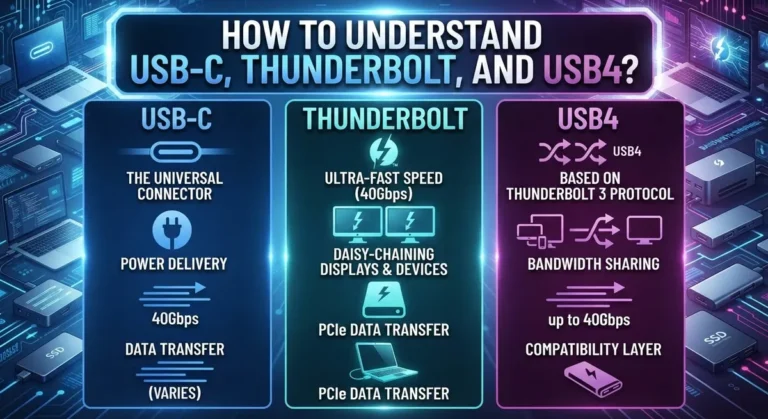
Check the connectivity standards your device uses. Research whether USB Type C, Bluetooth versions, or wireless protocols are becoming industry standards. Older connection types become harder to use as new peripherals emerge.
Look at the warranty and support availability. Longer warranties signal manufacturer confidence. Parts availability matters too. If repairs require rare components, your device becomes worthless when something breaks.
Examine the software ecosystem. Does the operating system receive regular updates? Will the manufacturer support this model for years? Popular platforms get longer support than niche options.
Test the performance headroom. A device running at 80 percent capacity handles future software bloat better than one running at maximum load today.
Finally, research the product’s track record. Look at older models from the same brand. Did they receive consistent updates? Do users report longevity? Real world experience tells you more than marketing claims.
Balance these factors against your actual needs. A professional workstation needs different longevity planning than a casual tablet.
Hardware Considerations: CPUs, Motherboards, and Upgrade Paths
When you choose a CPU and motherboard, you’re making one of the most important decisions for your system’s lifespan. The CPU socket type matters most. Different manufacturers use different sockets, and motherboards only accept specific CPUs. A motherboard with a popular socket gives you options to upgrade later without replacing the entire board.
Check how many generations of CPUs a motherboard supports. Some platforms allow you to use processors released over several years. Others lock you into just one or two CPU generations. A flexible platform means you can swap in a faster processor down the road without buying new components.
Motherboard features determine your upgrade potential. Look for multiple RAM slots so you can add memory later. Check for extra storage connections like M.2 slots and SATA ports. These extras give you room to expand without replacing existing parts.
Thermal design matters for longevity. A motherboard with good power delivery and quality components runs cooler and lasts longer. Adequate cooling prevents hardware degradation over time.
Consider the manufacturer’s track record with BIOS updates. Companies that regularly release firmware updates keep their boards compatible with new CPUs and fix security issues. This support extends your investment’s useful life.
Space inside your case affects future upgrades. Ensure your case has room for larger coolers, additional storage drives, and extra fans. Cramped spaces limit what you can add later.
Research the platform’s lifespan before buying. Some CPU sockets stay current for five years or more. Others fade quickly. Choosing an established, popular platform gives you better options when you want to upgrade individual components instead of replacing everything at once.
Software, Backups, and Ongoing Maintenance Habits
Software updates keep your system secure and functional. Manufacturers release patches regularly to fix vulnerabilities and improve performance. Enable automatic updates whenever possible so you don’t miss critical security fixes. Outdated software becomes a liability over time.
Backup your data consistently to protect against hardware failure, accidental deletion, and ransomware attacks. Use multiple backup methods: cloud storage, external drives, and offline copies. The 3-2-1 rule works well: keep three copies of your data, store them on two different media types, and keep one copy offsite. Test your backups occasionally to ensure they actually work when you need them.
Establish maintenance habits early. Clean your device vents and fans regularly to prevent overheating, which degrades components faster. Check disk space monthly and remove unnecessary files. Monitor your system’s temperature during heavy use to catch cooling problems before they damage hardware.
Regular maintenance extends your device’s lifespan significantly. Replace thermal paste on CPUs every few years if you open your system. Update drivers for graphics cards, storage controllers, and network adapters. These small actions prevent premature failures.
Create a schedule for your maintenance tasks. Mark your calendar for quarterly cleanings and monthly storage checks. Document what you backup and when. This approach removes guesswork and keeps your system healthy.
Software and backup habits matter more than most people realize. A device with perfect hardware but no backups is riskier than older hardware with solid data protection. Maintenance costs almost nothing but saves thousands in data loss or replacement expenses. Start these habits immediately with any device you own.
Smart Tips to Extend the Lifespan of Your Devices
Your devices work harder over time. Dust accumulates. Batteries lose capacity. Software grows heavier. Smart maintenance stops these problems before they damage your system.
Start by cleaning your device regularly. Dust clogs cooling vents and traps heat inside. Use compressed air or soft brushes to remove buildup from fans and air passages. This simple step prevents overheating and extends component life by years.
Monitor your device’s temperature during normal use. Most systems tell you their internal heat levels through built in software tools. If temperatures climb above normal ranges, your cooling system needs attention. Poor airflow signals a maintenance need before failure occurs.
Replace worn components before they fail completely. Batteries in laptops and phones degrade naturally. Thermal paste between your CPU and cooler dries out over time. Replacing these items keeps performance stable and prevents sudden breakdowns.
Create a maintenance schedule that fits your habits. Set reminders every three months to clean vents. Check battery health twice yearly. Update software as soon as updates arrive. Consistent habits prevent emergency repairs and unexpected downtime.
Keep your device in good physical condition too. Avoid extreme temperatures and humidity. Use protective cases for portable devices. Store equipment in clean, dry spaces. Physical protection matters as much as internal maintenance.
Document what you do and when you do it. A simple log helps you spot patterns. If your device overheats in summer, you’ll know to clean it before warm months arrive. Records also help technicians if repairs become necessary.
Maintenance costs far less than replacement. Small actions today prevent expensive problems tomorrow. Your devices reward consistent care with years of reliable performance.
Common Mistakes That Undermine Future-Proofing Efforts
Many people sabotage their tech investments without realizing it. Understanding these mistakes helps you make smarter choices that actually last.
Buying outdated technology is the first major error. You might find a great deal on last-generation hardware, but it becomes obsolete faster. The savings disappear when you need replacements sooner. Always check release dates and product cycles before purchasing.
Over-investing in future-proofing creates another problem. Some people spend excessive money on specs they’ll never use. This wastes resources and doesn’t guarantee longevity. Balance your budget between current needs and reasonable longevity expectations.
Ignoring data backup protocols puts your information at serious risk. Many people assume their devices will last forever without protecting their files. Hardware fails unexpectedly, and backups are your only safety net. Start backup habits immediately, not after problems occur.
Choosing rigid, non-upgradeable systems limits your options later. Sealed devices force complete replacements when components age. Look for systems with clear upgrade paths before buying. This flexibility saves money over years of ownership.
Skipping software updates weakens security and performance. Updates patch vulnerabilities and optimize your system. Delaying updates creates security gaps that hackers exploit. Install updates promptly as they become available.
Not researching emerging standards costs you compatibility headaches. New connection types and protocols replace old ones regularly. Understanding what’s coming helps you choose devices that work with future accessories and systems.
Neglecting physical care shortens device lifespan significantly. Dust buildup, temperature spikes, and impact damage accumulate over time. Simple cleaning and careful handling prevent expensive failures.
These mistakes are avoidable with awareness and planning. Focus on balance, research, and consistent maintenance habits for better long-term results.
Troubleshooting: What to Do When Tech Becomes Obsolete Anyway
When your tech becomes obsolete despite your best efforts, you have several practical options to consider. First, assess whether the device still meets your current needs. Sometimes older equipment works fine for basic tasks like email or web browsing, even if it cannot run the latest software.
If your device no longer functions properly, repair might be your first choice. Many older gadgets can be fixed affordably by local technicians. Replacement parts are often available for popular models. This approach costs less than buying new equipment.
Repurposing is another smart solution. A slow laptop can become a dedicated streaming device or file storage server. An older smartphone works well as a security camera or media player. Think creatively about secondary uses before discarding anything.
Recycling programs exist specifically for electronics. Many manufacturers and retailers accept old devices for proper disposal. This prevents harmful materials from entering landfills and recovers valuable metals and components.
Donation is worth considering too. Schools, nonprofits, and community centers often need functional older technology. Your outdated device might be perfect for someone with different needs or budget constraints.
Selling used tech online reaches buyers who want affordable options. Even broken devices have value to repair shops and parts sellers.
The key is recognizing that obsolescence does not mean worthlessness. You have multiple paths forward depending on your situation. Repair extends lifespan. Repurposing finds new value. Recycling protects the environment. Donation helps others. Selling recovers some investment.
Plan ahead by choosing devices with clear repair and upgrade paths from the start. This reduces the chances of complete obsolescence. When it does happen anyway, you will have options that work for your budget and values.
Final Thoughts
Future-proofing your tech does not mean chasing every new trend. It means making smart choices that grow with you.
Start with the basics. Pick devices with flexible upgrade paths. This gives you room to adapt as your needs change.
Balance matters more than perfection. You do not need the newest chip or the biggest case. You need components that fit your budget and your goals.
Over-investing wastes money on features you will never use. Under-investing leaves you stuck with outdated tech too soon. Find the middle ground that works for your situation.
Keep your habits consistent. Update software often. Back up your data on a regular schedule. Watch for new standards in your industry, like Matter for smart homes.
These small actions protect your investment better than any single purchase decision.
Remember that no device lasts forever. Even the best planning cannot stop technology from changing. What you can control is how well you prepare for that change.
Ask yourself simple questions before buying. Will this fit my needs in two years? Can I upgrade parts of it later? Does the manufacturer support it with updates?
These questions guide better decisions than any spec sheet alone.
Think of future-proofing as an ongoing process, not a one time purchase. You adjust your approach as new information appears. You stay flexible instead of locked into rigid plans.
The goal is simple. Get the most value from your tech without overspending or falling behind. Combine smart buying with consistent care, and your devices will serve you well for years to come.
Frequently Asked Questions
Should I buy the latest tech or wait for next year’s models?
The answer depends on your actual needs right now. If your current device works fine, waiting makes sense. If you need it today, buy now and focus on choosing components with clear upgrade paths instead. Buying too early wastes money on features you don’t need yet. Waiting too long means using outdated gear that frustrates you daily.
The best approach? Purchase when your current device fails or no longer handles your tasks. Then select something built to last, not something that’s the absolute newest.
How do I know if a device has good upgrade potential?
Look for systems with flexible, open designs. Desktops typically offer more upgrade options than laptops. Check if you can swap the CPU, add more RAM, or upgrade storage without breaking the device open.
Research the manufacturer’s track record. Do they release new components regularly? Can you find replacement parts easily? Strong CPU platforms with flexible motherboards tend to stay useful longer because companies keep making compatible upgrades.
Read user reviews about expandability. Real owners share honest details about what you can and cannot upgrade later.
Is it wasteful to over-invest in future-proofing?
Yes, absolutely. Buying expensive features you’ll never use is throwing money away. You don’t need the highest specs if your work doesn’t demand them.
Balance is essential here. Spend a bit extra on things that matter: good cooling, extra case space, and standard connections. Skip the premium options that won’t benefit your actual workflow.
What’s the most important thing I can do right now?
Keep your software updated regularly. This single habit protects security, improves performance, and extends device life significantly. It costs nothing and takes minutes.
Also, backup your data consistently. No device lasts forever, and your files matter more than the hardware.

Dillip is the founder and editor of Switch & Size, where he breaks down tech products, accessories, and gadgets to help readers make smarter buying decisions. With a passion for testing and comparing the latest technology, he delivers honest reviews, in-depth guides, and side-by-side comparisons that cut through the marketing noise.